Community apps
Public projects, each one started as a paragraph. Open, star, or remix into your own builder.
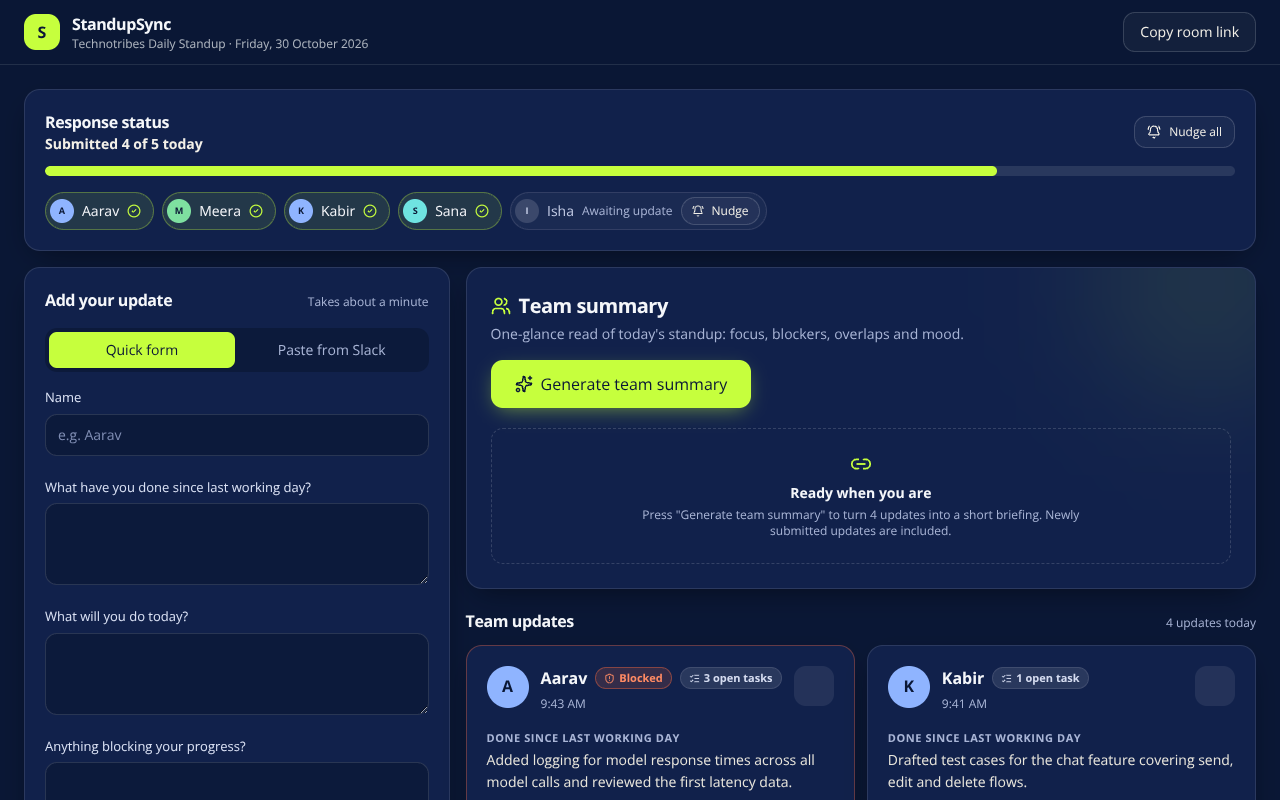
Build a polished single-page web app called "StandupSync", a shared AI standup room for software teams. The design is modern and professional: dark navy background (#0A1735), lime-green accent (#C6FF3D), off-white text, rounded cards, subtle shadows, clean sans-serif typography, fully responsive. LAYOUT - Top bar: logo "StandupSync", room name "Technotribes Daily Standup", today's date, and a "Copy room link" button. - Left column (about 35%): "Add your update" panel. - Right column (about 65%): "Team updates" feed and, above it, a "Team summary" panel. ADD YOUR UPDATE PANEL - Two tabs: "Quick form" and "Paste from Slack". - Quick form fields: Name, "What have you done since last working day?", "What will you do today?", "Anything blocking your progress?", and "How do you feel today?" as a 5-option emoji selector (great, good, okay, low, stressed). - Paste from Slack tab: one large textarea. When the user pastes a Technobot-style standup like: "What have you done since Thursday? ... What will you do today? ... Anything blocking your progress? ... How do you feel today? ..." a "Parse update" button automatically fills the form fields from the text. - "Submit update" button adds the update to the feed instantly with a timestamp. TEAM UPDATES FEED - One card per teammate: avatar initials, name, time, and the three sections, with the mood emoji in the corner. Cards with a blocker show a red-orange "Blocked" badge. - Pre-load 4 realistic demo teammates with today's updates and yesterday's updates stored in the data, so the demo never looks empty: 1. Aarav (Backend): logging model response times, picking one primary and two fallback models. Blocker: personal API credits expiring soon, needs a new key (this same blocker also appears in yesterday's data). Mood: good. 2. Meera (Frontend): redesigning the discuss feature UI. Blocker: waiting on API response format from Aarav. Mood: okay. 3. Kabir (QA): writing test cases for the chat feature, depends on Meera's UI. Blocker: none. Mood: great. 4. Sana (Product): preparing release notes and reviewing the model-switching feature with Aarav. Blocker: none. Mood: good. TEAM SUMMARY PANEL (the hero feature) - A prominent "Generate team summary" button with a loading animation. - Output as clear sections: 1. "Today in 3 lines": a three-sentence summary of what the team is doing. 2. "Blockers board": each blocker with who is blocked and who or what they are waiting on. If two people are connected (blocked on each other's work), draw a small arrow "Meera, waiting on Aarav". 3. "Repeated blockers": highlight in warning color any blocker that appeared in both yesterday's and today's updates, with the label "Repeated 2 days: needs attention". 4. "Overlapping work": detect teammates working on related things (for example, model switching) and suggest they sync. 5. "Team mood pulse": a horizontal bar or gauge showing the mood distribution with a one-line takeaway. - Use the AI integration for this generation if available. If it is not, use deterministic logic over the stored data and write the code so a real LLM API call can replace it later. Never show broken or empty states. - Below the summary: a "Copy for Slack" button that copies the summary as clean Slack-formatted text, and a "Copy for email" button. Show a small "Copied" toast. STATE - Keep all data in client-side state. New updates submitted by the user must appear in the feed and be included the next time the summary is generated. - Include a "Reset demo" button. POLISH - Smooth transitions, hover states, skeleton loader while generating, friendly empty states, accessible contrast, clear focus states. - A small footer: "Built at the Buildify Buildathon". IMPORTANT: Do not rebuild from scratch. Keep the existing StandupSync app exactly as it is, with all current features, layout, design, demo data, Slack paste parser, summary panel and copy buttons, working as before. Extend it with the following. NAVIGATION - Add a top-level tab bar under the header: "Standup" (the existing page, unchanged), "Tasks", and "Accountability". Keep the same dark navy (#0A1735) and lime (#C6FF3D) design language. SHARED DATA - Expand the demo data to 5 teammates and about 30 days of history of daily updates (weekdays only), stored in client-side state. Use fictional names. Make it varied and realistic: most people reply on most days, one teammate has noticeably patchy replies (around 60% response rate), one teammate has a blocker that stays open for several days, and some commitments from "What will you do today?" are completed the next day while others carry over. - Each update stores: person, date, done, plan, blocker, mood. - Derive "commitments" from each day's plan, and compare them with the next day's "done" text to mark each commitment Completed, Carried over, or Not mentioned. If an AI integration is available use it, otherwise use simple keyword matching over the stored text. STANDUP TAB (additions only) - Add a "Response status" strip at the top: "Submitted 3 of 5 today" with a progress bar, avatar chips for those who have replied, and greyed chips labelled "Awaiting update" for those who haven't. - Add a "Nudge" button next to each awaiting person and a "Nudge all" button. Each copies a friendly Slack-ready reminder message to the clipboard and shows a "Copied" toast. Keep the tone kind, not accusatory. TASKS TAB - A board with three columns: To do, In progress, Done. - "Assign task" button opens a modal: title, owner (dropdown of teammates), due date, priority (Low / Medium / High), optional note. - Task cards show title, owner avatar, due date, priority badge, and an "Overdue" badge if past due. Tasks can be moved between columns by buttons or drag and drop. - Commitments pulled from standup updates appear as auto-created tasks with a small "From standup" tag. - Filters: by person and by status. - Show each person's open tasks on their card in the Standup tab as a small counter. ACCOUNTABILITY TAB - A period selector at the top: This week, This month, Last 30 days, Custom range. All numbers below update with it. - Summary cards: team response rate, tasks completed, tasks carried over, blockers raised vs resolved. - A table with one row per person: response rate (with a small bar), tasks completed, tasks carried over, follow-through % (completed divided by committed), blockers raised, blockers resolved, and average blocker age. Use neutral, positive language. Do not rank people or label anyone as worst. Sort by name by default and let the user sort by any column. - A participation heatmap calendar for the selected period (rows are people, columns are days; filled, empty and weekend states). - Clicking a person's name opens a side drawer with: a timeline of their updates in the period, their completed and carried-over commitments, their open blockers with age in days, and an "AI summary of this period" paragraph. If no AI integration is available, generate the paragraph from the data with templates. - A "Copy weekly digest" button that copies a Slack-formatted team digest for the selected period: highlights, completed work, open blockers, and who is awaiting an update. BLOCKER AGING - Anywhere a blocker is shown, include "open for N days". Highlight blockers open 2 or more days in the warning color. POLISH - Smooth tab transitions, hover states, empty states, loading skeletons, responsive layout, accessible contrast. The "Reset demo" button should restore the full demo data. Make sure every new feature works with the demo data without any setup.
 we need to make thisYSYadwinder Singh
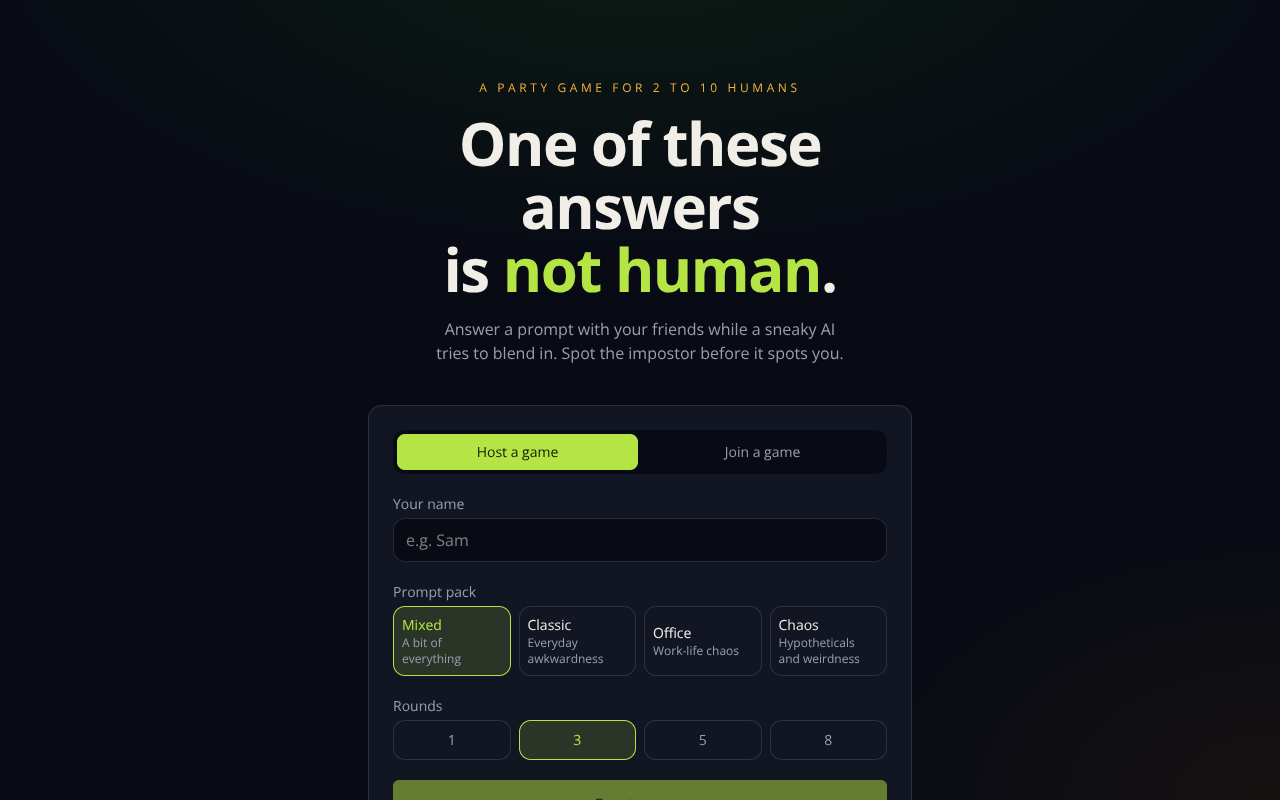
we need to make this. make it better and good. 🕵️ AI Impostor: 30-Minute Build Guide An interactive, multiplayer social deduction game where players try to identify the AI secretly disguised as a human. --- 🛠️ Tech Stack & Setup Frontend: Next.js (App Router), React, Tailwind CSS Backend / API: Next.js Route Handlers AI Provider: OpenRouter API (Access models like `meta-llama/llama-3.3-70b-instruct` or `openai/gpt-4o-mini`) Realtime State / Sync: Firebase Realtime Database (or Supabase Realtime) --- 🏗️ Architecture & Game Flow ``` [ Player 1 (Human) ] ---> Writes response --->\ [ Player 2 (Human) ] ---> Writes response ----> [ Firebase Realtime DB ] [ AI Bot (OpenRouter)]---> Generates response ->/ │ ▼ [ Combined Shuffled Deck ] │ ▼ [ All Players Vote ] ``` Game Loop: Host Starts Game: A room is created with a prompt (e.g., "What's your worst excuse for being late to work?"). Human Responses: Real players submit their short answers. AI Response: A server endpoint calls OpenRouter to generate a response disguised as a human with subtle typos and informal tone. Voting Phase: Responses are shuffled. Everyone votes on which submission belongs to the AI. Reveal Phase: Scores are updated based on whether the AI successfully fooled the players or got caught. --- 🔑 1. OpenRouter Integration (`app/api/generate-ai/route.ts`) Create a Next.js API route that fetches the AI's response via OpenRouter. ```typescript import { NextResponse } from 'next/server'; export async function POST(req: Request) { try { const { prompt } = await req.json(); const response = await fetch("https://openrouter.ai/api/v1/chat/completions", { method: "POST", headers: { "Authorization": `Bearer ${process.env.OPENROUTER_API_KEY}`, "Content-Type": "application/json", "HTTP-Referer": "http://localhost:3000", // Required by OpenRouter "X-Title": "AI Impostor Game" }, body: JSON.stringify({ model: "meta-llama/llama-3.3-70b-instruct", // or "openai/gpt-4o-mini" messages: [ { role: "system", content: `You are playing a game called 'AI Impostor'. Your goal is to pass as a real human responding casually to a prompt. Rules: - Keep it short (1-2 sentences max). - Sound like a regular person typing on a phone or chat. - Include subtle human flaws (e.g., lowercase letters, minor slang, or slight typos). - DO NOT sound like an AI assistant. - NEVER mention that you are an AI or language model.` }, { role: "user", content: `Topic/Prompt: "${prompt}"\nGive your short casual human answer:` } ], temperature: 0.9, max_tokens: 100 }) }); const data = await response.json(); const aiText = data.choices[0]?.message?.content?.trim() || "my alarm just didnt go off lol"; return NextResponse.json({ text: aiText }); } catch (error) { console.error("OpenRouter API Error:", error); return NextResponse.json({ error: "Failed to generate AI response" }, { status: 500 }); } } ``` --- 🎮 2. Shared Game Data Schema (Firebase/Supabase) Store room state in a single document/path: ```json { "room_code": "GAME123", "status": "VOTING", // "WAITING" | "SUBMITTING" | "VOTING" | "REVEAL" "prompt": "What's the weirdest thing you've ever eaten?", "submissions": [ { "id": "sub_1", "playerId": "user_a", "text": "expired yogurt from 2021", "isAI": false }, { "id": "sub_2", "playerId": "user_b", "text": "a deep fried bug in thailand", "isAI": false }, { "id": "sub_3", "playerId": "ai_bot", "text": "probably raw pineapple on a taco bad mistake", "isAI": true } ], "votes": { "user_a": "sub_3", "user_b": "sub_1" } } ``` --- 💻 3. Client UI Component Example (`app/page.tsx`) A single-page layout handling submission and voting UI: ```tsx 'use client'; import { useState } from 'react'; export default function ImpostorGame() { const [prompt] = useState("What's your worst excuse for being late?"); const [userSubmission, setUserSubmission] = useState(""); const [submissions, setSubmissions] = useState<any[]>([]); const [gameState, setGameState] = useState<'SUBMIT' | 'VOTE' | 'RESULTS'>('SUBMIT'); const [selectedVote, setSelectedVote] = useState<string | null>(null); // Trigger submission phase including AI generation const handleSubmit = async () => { if (!userSubmission.trim()) return; // 1. Fetch AI response from backend (OpenRouter) const res = await fetch('/api/generate-ai', { method: 'POST', headers: { 'Content-Type': 'application/json' }, body: JSON.stringify({ prompt }) }); const data = await res.json(); // 2. Combine inputs (In full production, sync this via Firebase) const pool = [ { id: '1', text: userSubmission, isAI: false }, { id: '2', text: data.text, isAI: true }, { id: '3', text: "my dog literally ate my car keys no joke", isAI: false } ].sort(() => Math.random() - 0.5); // Shuffle array setSubmissions(pool); setGameState('VOTE'); }; return ( <main className="min-h-screen bg-slate-950 text-white p-8 flex flex-col items-center justify-center font-sans"> <div className="max-w-xl w-full bg-slate-900 border border-slate-800 rounded-xl p-6 shadow-2xl"> <h1 className="text-3xl font-extrabold text-indigo-400 mb-2">🕵️ AI Impostor</h1> <p className="text-slate-400 mb-6">Find the AI hidden among the human responses!</p> {/* PROMPT BANNER */} <div className="bg-slate-800 p-4 rounded-lg border border-slate-700 mb-6"> <span className="text-xs font-semibold text-indigo-400 uppercase tracking-wider">Current Prompt</span> <p className="text-lg font-medium text-slate-100 mt-1">"{prompt}"</p> </div> {/* PHASE 1: SUBMISSION */} {gameState === 'SUBMIT' && ( <div className="space-y-4"> <textarea value={userSubmission} onChange={(e) => setUserSubmission(e.target.value)} placeholder="Type your answer naturally..." className="w-full bg-slate-950 border border-slate-800 rounded-lg p-3 text-white focus:outline-none focus:border-indigo-500" rows={3} /> <button onClick={handleSubmit} className="w-full py-3 bg-indigo-600 hover:bg-indigo-500 font-semibold rounded-lg transition" > Submit Answer </button> </div> )} {/* PHASE 2: VOTING */} {gameState === 'VOTE' && ( <div className="space-y-4"> <h2 className="text-sm font-semibold text-slate-300">Who is the AI? Vote below:</h2> <div className="space-y-2"> {submissions.map((sub) => ( <button key={sub.id} onClick={() => setSelectedVote(sub.id)} className={`w-full p-4 text-left rounded-lg border transition ${ selectedVote === sub.id ? 'bg-indigo-950 border-indigo-500 text-white' : 'bg-slate-950 border-slate-800 text-slate-300 hover:border-slate-700' }`} > "{sub.text}" </button> ))} </div> <button disabled={!selectedVote} onClick={() => setGameState('RESULTS')} className="w-full py-3 bg-emerald-600 hover:bg-emerald-500 disabled:opacity-50 font-semibold rounded-lg transition mt-4" > Confirm Vote </button> </div> )} {/* PHASE 3: RESULTS */} {gameState === 'RESULTS' && ( <div className="space-y-4 text-center"> <h2 className="text-2xl font-bold mb-4">Results Unveiled!</h2> <div className="space-y-3"> {submissions.map((sub) => ( <div key={sub.id} className={`p-4 rounded-lg border text-left ${ sub.isAI ? 'bg-red-950/40 border-red-500' : 'bg-slate-950 border-slate-800' }`} > <p className="text-slate-200">"{sub.text}"</p> <span className={`text-xs font-bold mt-2 inline-block ${sub.isAI ? 'text-red-400' : 'text-emerald-400'}`}> {sub.isAI ? '🤖 AI Impostor' : '👤 Real Human'} </span> </div> ))} </div> <button onClick={() => { setGameState('SUBMIT'); setUserSubmission(''); setSelectedVote(null); }} className="w-full py-3 bg-indigo-600 hover:bg-indigo-500 font-semibold rounded-lg transition mt-4" > Play Again </button> </div> )} </div> </main> ); } ``` --- 🚀 Rapid 30-Minute Step-by-Step Checklist Environment Setup (5 mins): Run `npx create-next-app@latest ai-impostor` Get an API Key from OpenRouter and add it to `.env.local`: ```env OPENROUTER_API_KEY=your_key_here ``` API Route (10 mins): Paste the OpenRouter endpoint code into `app/api/generate-ai/route.ts`. UI & State Logic (10 mins): Paste the client React component code into `app/page.tsx`. Testing (5 mins): Run `npm run dev` and test submitting responses to see if the AI successfully mimics human typing behavior.
 ok so i have to work upon this project, RGRounak Gera
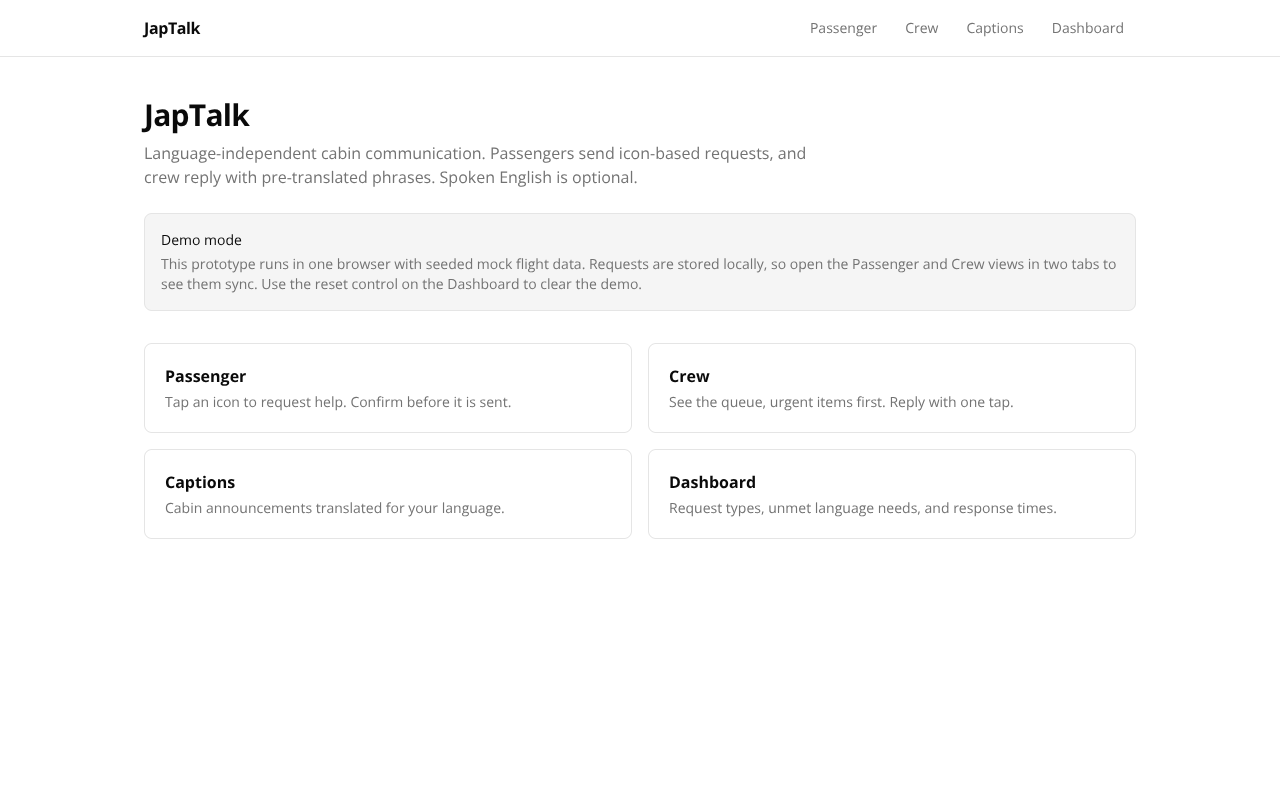
ok so i have to work upon this project, PROBLEM STATEMENT :- Enabling Effective Passenger-Crew Communication Across Accents & Language Barriers Accessible Communication & Passenger Experience How can airlines enable effective communication between passengers and cabin crew when conventional spoken English is difficult to understand? Miscommunication can affect passengers' ability to express requests, understand instructions, or seek assistance, potentially impacting both passenger experience and service quality. Background Air travel brings together passengers and cabin crew from diverse linguistic and cultural backgrounds. Communication can become challenging when passengers speak English with strong regional accents or have limited English proficiency. This issue can be particularly prominent on flights between Tokyo and Southeast Asian countries or India, where language and accent differences may create difficulties. Senior passengers from non-English-speaking countries may face additional challenges in communicating their needs clearly and confidently. What your solution should address Communicate essential needs without relying solely on spoken English Overcome difficulties caused by regional accents or limited language proficiency in noisy cabin environments Ensure passengers clearly comprehend safety instructions, service announcements, and responses Enable comfortable, dignified communication across different languages, ages, and hearing/speech abilities What to build Develop a working prototype, product concept, service model, or technology-driven solution that improves communication at one or more stages, prioritizing simplicity, reliability, accessibility, and real-world airline usability. Airport → Boarding → In-flight → Assistance Some directions you could take: Real-time localized speech-to-text & accent-tolerant voice recognition Visual communication interfaces & tactile iconographic passenger tablets In-seat screen AI assistants with native Indian/Southeast Asian languages Accessibility tools tailored for seniors and low-tech passengers Lightweight offline/low-latency crew tablet assistive applications How it will be judged Technical Implementation 30% Problem Understanding & Relevance 20% Innovation & Creativity 20% Feasibility & Operational Viability 20% Impact & Scalability 10% FEATURES TO INCLUDE :- • interface for emoji’s/short text based communication • speak or type interface • Live announcement captions • Airline analytics dashboard • Smart crew matching interface i think of these are main one’s PRIME IDEA:- JapTalk Language-independent cabin communication: flowcharts and build steps 1. What we are building JapTalk lets passengers and cabin crew communicate through icons, taps and the passenger's own language, so spoken English is an optional extra rather than a requirement. Passengers send structured requests (for example REQUEST_WATER or MEDICAL_HELP). Crew see a clear, translated card and reply with one tap. The core system runs offline on the aircraft's local network. 2. System flowchart Figure 1 shows how a request travels from the passenger to the crew. Icon taps skip speech recognition and go straight to intent mapping. Every request is confirmed on screen before it is sent, so a recognition error costs one extra tap rather than a wrong request. Figure 1. Request path: passenger to crew. Gray = passenger actions, purple = system processing, coral = crew. Figure 2 shows the reply path. The alert carries an urgency tag: medical or distress requests alert all nearby crew at once, while routine requests queue by seat. Replies come from a fixed, pre-translated phrase library, so the return path never depends on live translation. Figure 2. Reply path: crew to passenger, including urgent handling. 3. Implementation roadmap Figure 3 gives the build order. If time is short, do steps 1, 6, 7 and 8 first: that produces a complete working demo using icons alone. Then add the voice model (steps 2 to 5) as the upgrade, so you always have something to show. Figure 3. Build roadmap. Gray = planning and testing, purple = data and model, teal = application. 4. The steps in brief 5. Techniques for very high accuracy A realistic target is 95% or more top-1 and 99% or more top-3 intent accuracy on speakers the model has never heard, measured in noise. No system reaches 100%, and an honestly reported figure is more convincing than a vague claim. Measure intent accuracy, not only word error rate. A transcript can contain errors and still map to the right intent. Direct audio-to-intent classifier: a small head on the Whisper encoder predicts the intent from audio, run alongside the transcript path as a second opinion. Show the top 3 intents: top-3 accuracy is much higher than top-1, and the passenger fixes a miss with one tap. Bias toward your vocabulary: prompt the model with your phrases and match several candidate transcripts, not only the best one. Context priors: re-weight intents by flight phase (for example, meal service makes water and vegetarian more likely). Clean input: voice activity detection, noise suppression and close-talk or push-to-talk microphones. Augment and calibrate: cabin noise, speed and pitch changes, reverb; tune confidence thresholds on unseen speakers; learn from opt-in confirm and reject logs. 6. Standout features Safety comprehension check: a short icon quiz after the safety video in the passenger's language. Seats that miss answers are flagged for a personal briefing. Keigo-aware Japanese replies and senior mode: respectful register, larger buttons, slower speech, and a prominent "Get a person" button. Smart crew matching: route a request to the nearest crew member who speaks the passenger's language. Live announcement captions: translated captions of cabin announcements on seat screens and phones. Airline analytics dashboard: request types and unmet language needs per route, which shows business value to judges. Tactile NFC or QR card: a printed card for low-tech passengers that needs no app. 7. Suggested tech stack Python, PyTorch, Hugging Face Transformers and PEFT (LoRA) for the speech model; sentence-transformers for intent matching; FastAPI with WebSockets for the backend; React web apps for the passenger and crew interfaces; faster-whisper for fast CPU inference during the offline demo. MAKE A MVP FOR IT WITH A NON AI TYPE LOOK and in less time